 SDF Builder
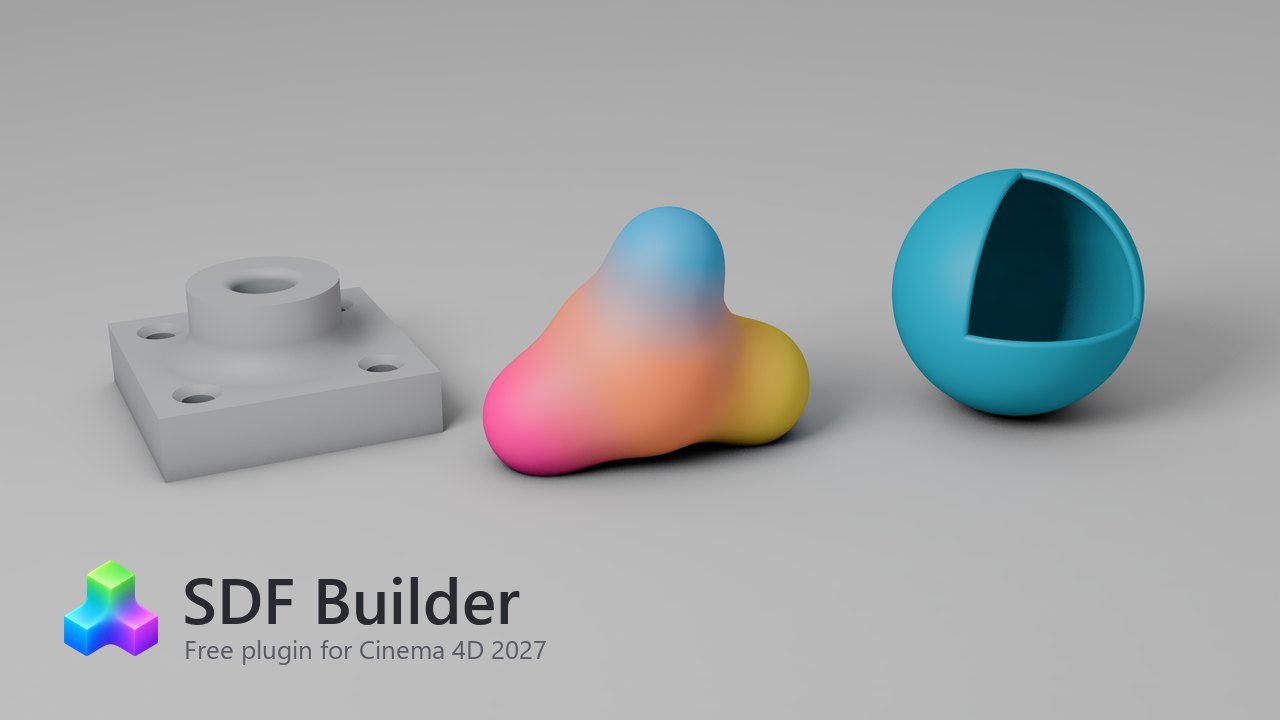

Model freely. Create without limits.
A procedural modeling plugin that lets you forget about polygons and focus on shapes.
Add, subtract, blend. From hard-surface to organic forms, build fast and rework as often as you like.
The freedom of Volume Builder, with sharp edges and speed.
Shapes are calculated from formulas, so crisp edges and smooth blends stay responsive. Polygons, splines and Cloners work as sources too, and effects like Bevel and Noise can be controlled with Fields.
もっと自由に、形をつくろう。
ポリゴンを気にせず、形づくりに集中できるプロシージャルモデリングプラグインです。
足す、引く、なめらかにつなぐ。ハードサーフェスから有機的な形まで、素早く作って何度でも作り直せます。
Volume Builder の自由さに、シャープなエッジと速さを。
形を数式で計算するので、鋭いエッジもなめらかなブレンドも軽快です。ポリゴンやスプライン、クローナーも素材になり、ベベルやノイズなどのエフェクトはフィールドで調整できます。
Features
主な機能
Item modes
合成モード

Union
合成
Adds the item's shape to what is below. With a blend (Soft, Smooth or Chamfer) the two flow into each other; without one, the edge stays sharp.
アイテムの形を下の形に足します。ソフト・スムーズ・面取りのブレンドでなめらかにつなぐことも、ブレンドなしでシャープなまま足すこともできます。
Subtract
減算
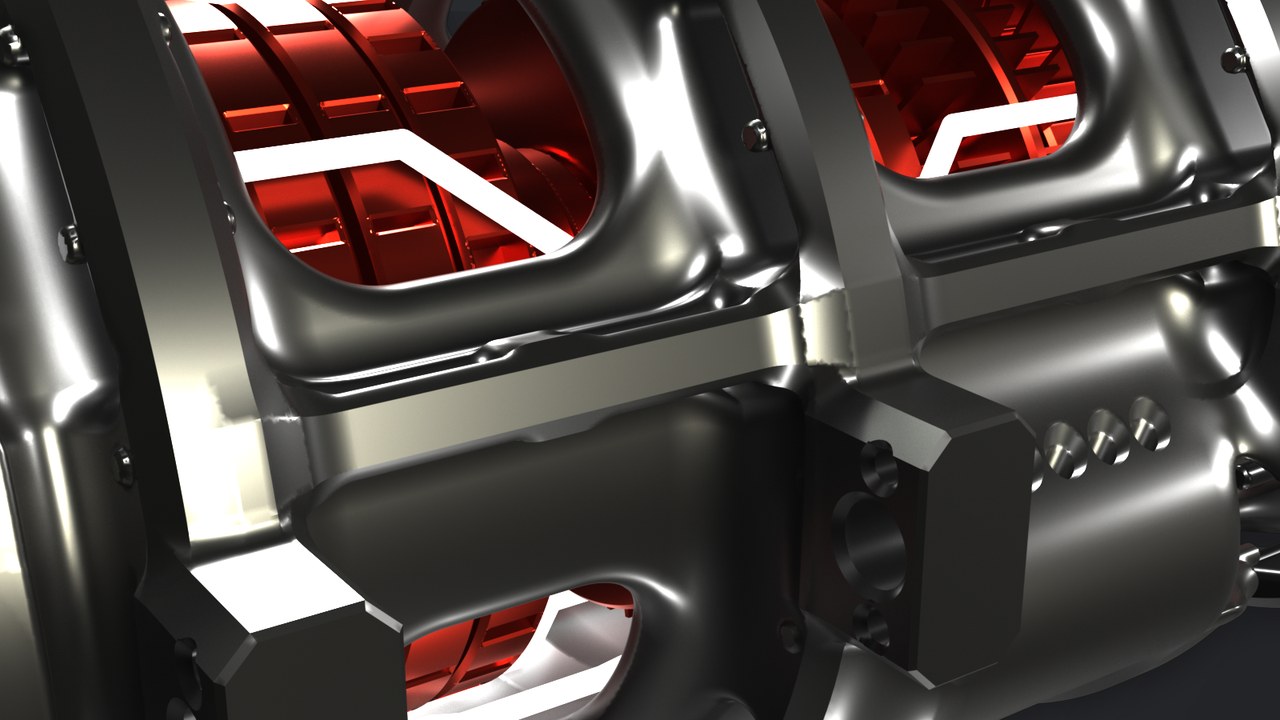
Cuts the item's shape out of what is below - holes, slots and machined faces, sharp or blended.
アイテムの形で下の形を削ります。穴、スリット、削り出しの平面を、シャープにもブレンド付きにも。
Intersect
交差
Keeps only what the item and the shapes below have in common.
アイテムと下の形の重なった部分だけを残します。
Exclusive (XOR)
排他(XOR)
Keeps what is inside one of the two but not both - the overlap becomes a hollow.
どちらか一方にだけ含まれる部分を残し、重なった所をくり抜きます。
Morph
モーフ
Turns what is below into the item's shape by the amount (0 - 100) - animate it for a smooth change of form.
量(0〜100)に応じて、下の形をアイテムの形へ変えていきます。キーフレームで形の変化をアニメーションに。
Stencil
ステンシル
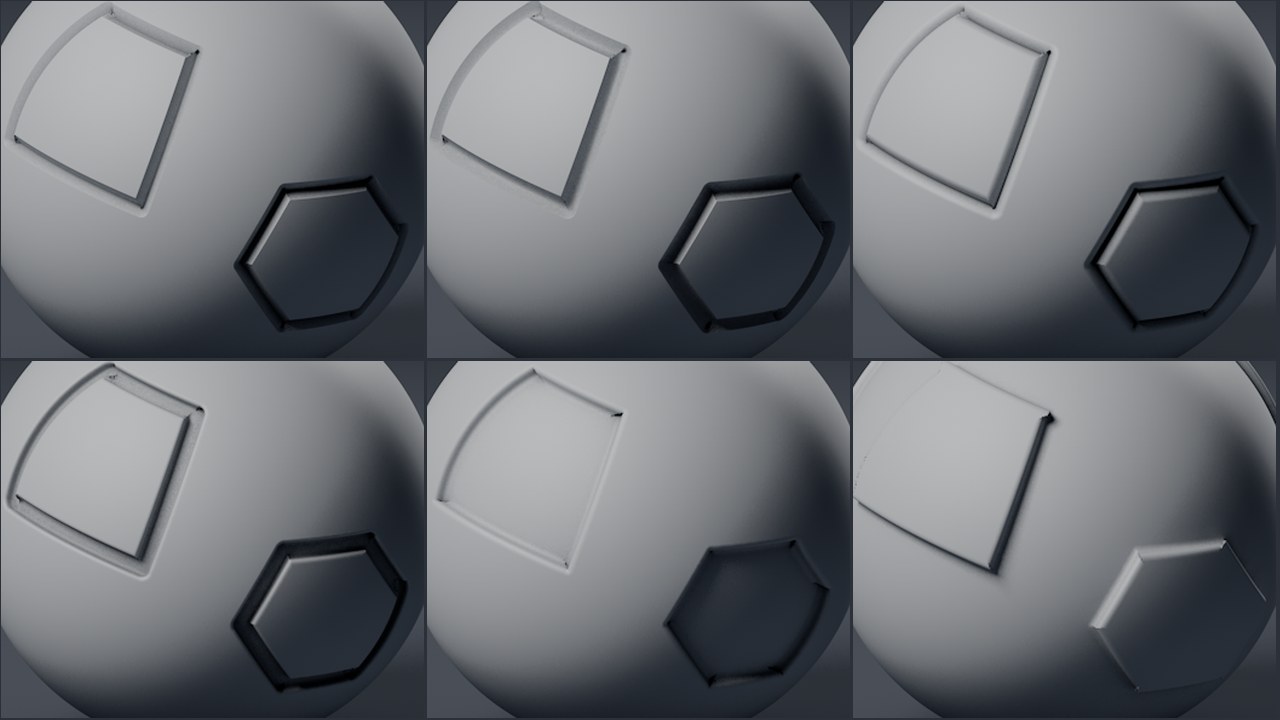
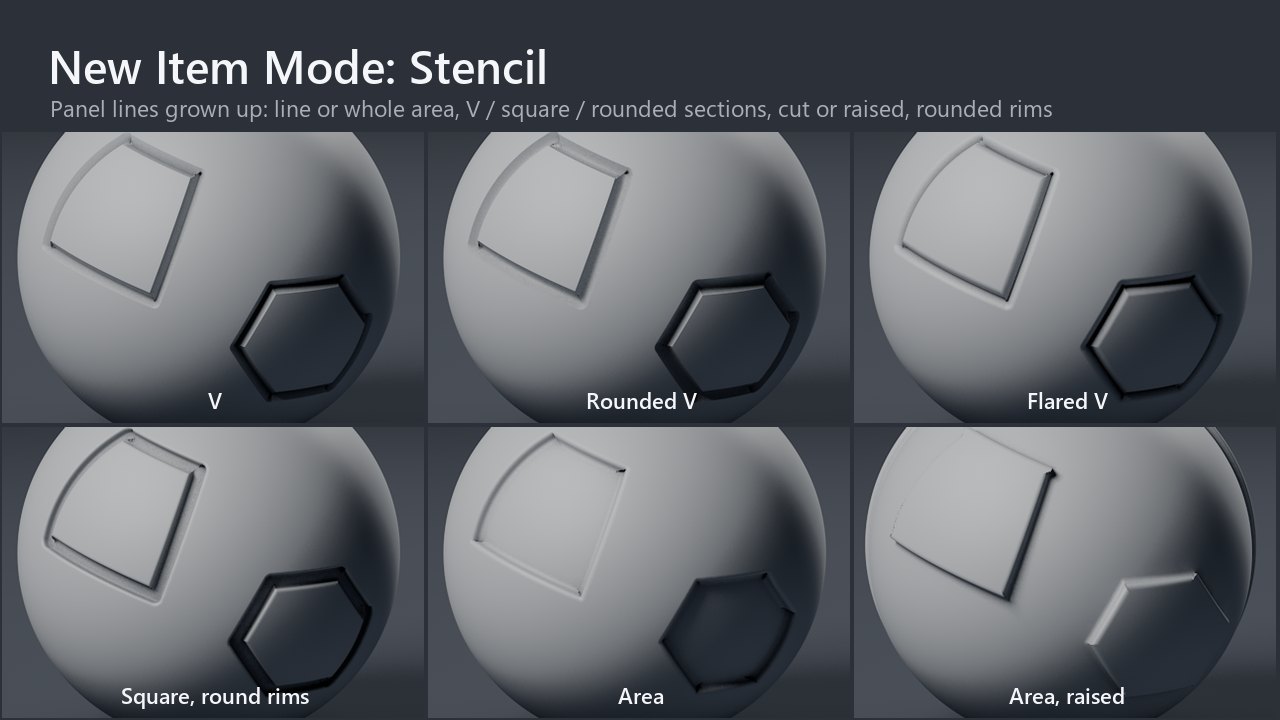
Presses an item's shape onto the surface below: its outline as a line, or the whole area, cut in or raised. V, square or rounded sections.
アイテムの形を下の面に押し当て、輪郭のラインや面全体を彫る、または盛り上げます。断面は V 字・角・丸みから選べます。
Color
カラー
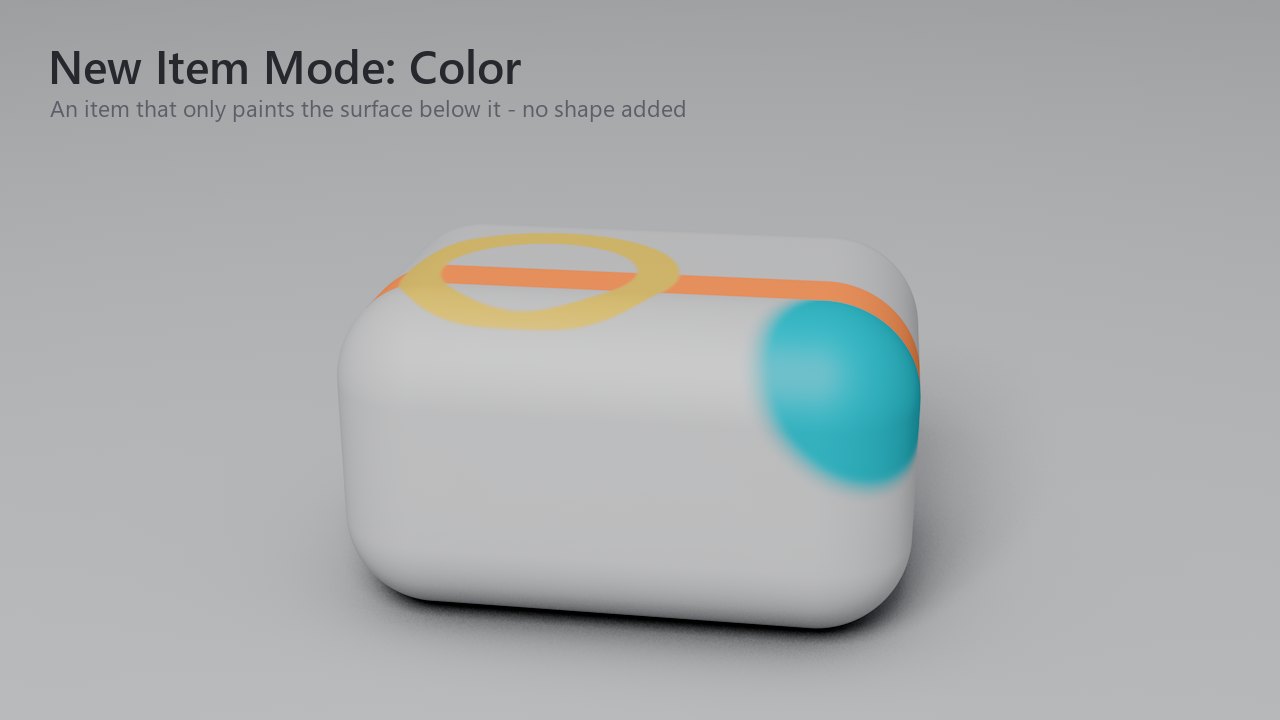
Paints the surface below with the item's color inside its shape, without adding anything to the form. The edge of the color can be soft.
形は足さずに、アイテムの形の内側だけ下の面を、そのアイテムの色で塗ります。色の境目はふんわりにもできます。
Effects
エフェクト
Bevel
ベベル
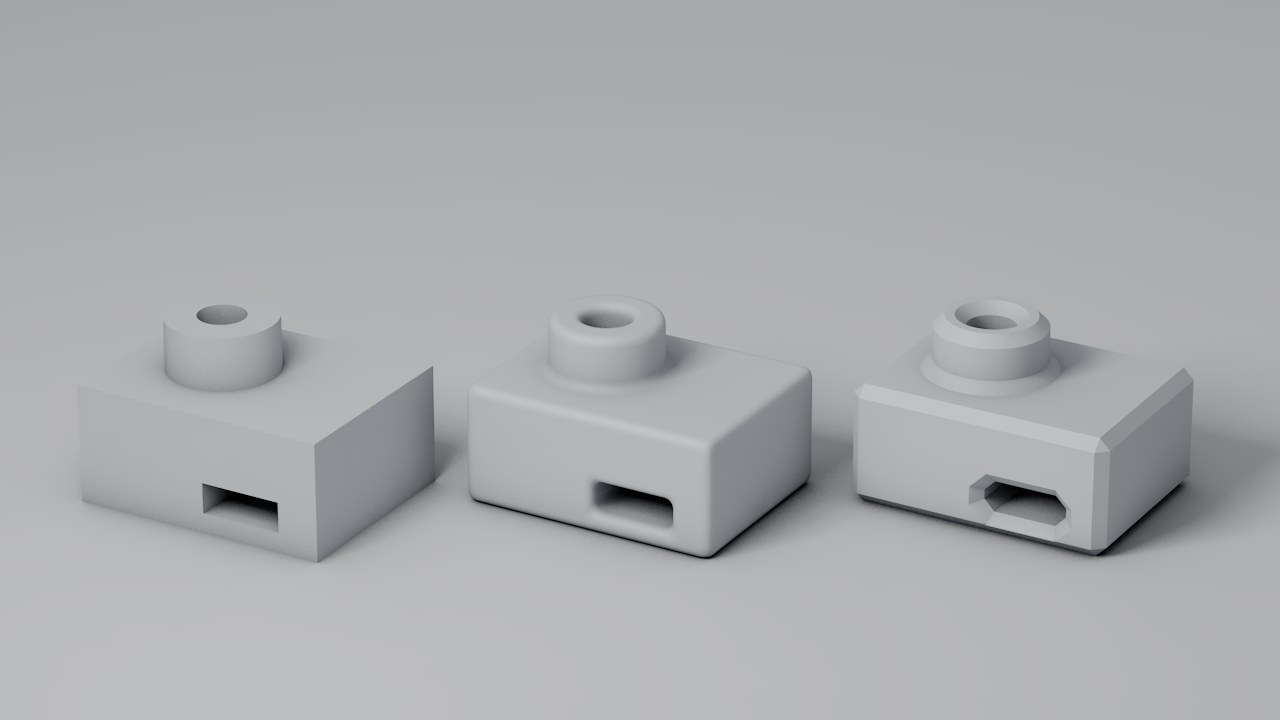
Rounds or chamfers the edges below - all of them, convex or concave only, or just the edges you pick in the viewport. The bevel follows when the shapes change.
下の形のエッジをラウンドまたは面取りにします。対象はすべて・凸だけ・凹だけ、またはビューポートで選んだエッジだけ。形を変えても追従します。
Offset
オフセット
Grows or shrinks everything below by the amount.
下の形全体を、量の分だけ太らせる/痩せさせます。
Shell
シェル
Turns everything below into a skin of the given thickness.
下の形全体を、指定した厚みの殻にします。
Noise
ノイズ
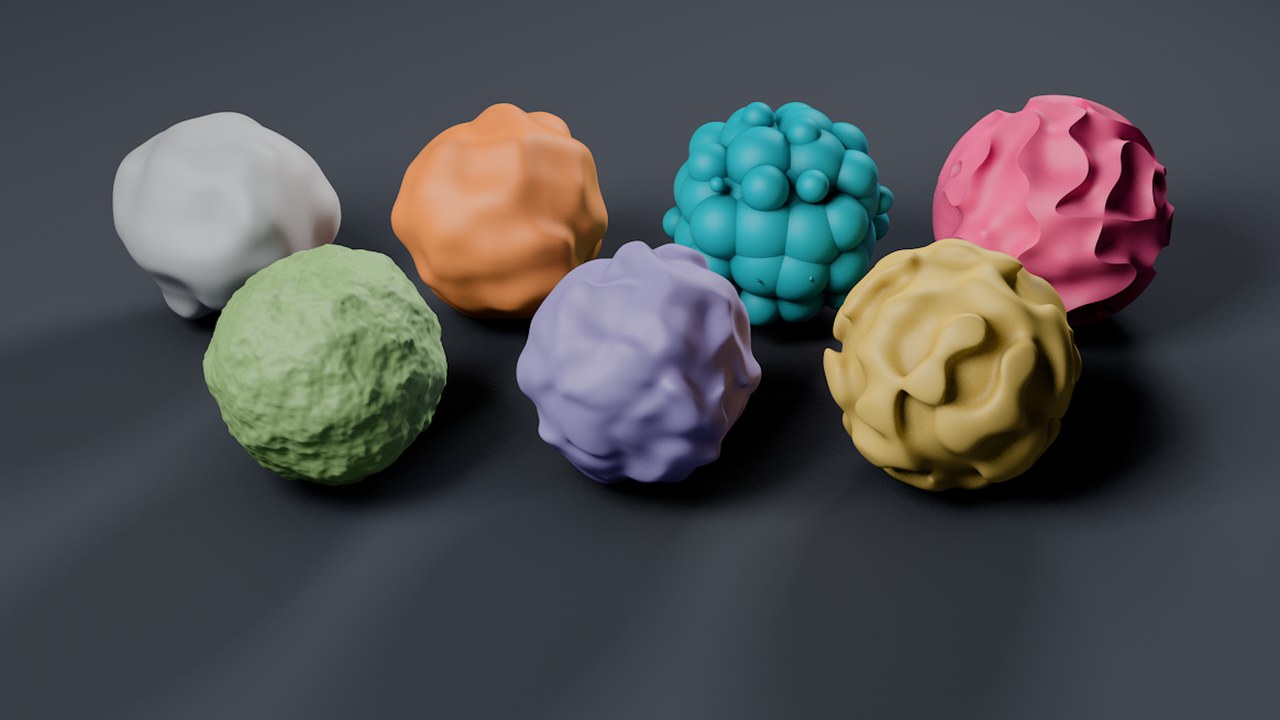
Adds bumps to the surface below. Seven kinds: Value, Perlin, Cell, Ridge, Turbulence, Warp and Stripes & Spots.
下の形の表面に凹凸を付けます。種類は値・パーリン・セル・リッジ・乱流・ゆがみ・しまと斑点の 7 つ。
Perforate
パーフォレート
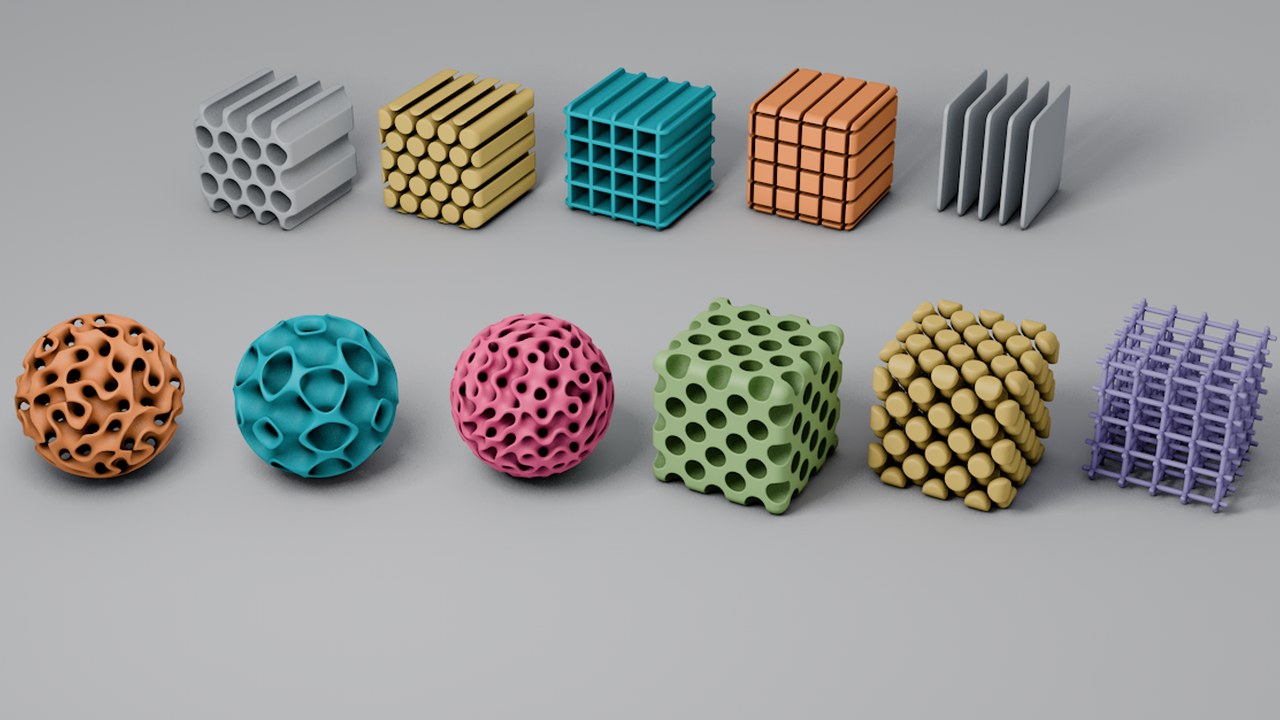
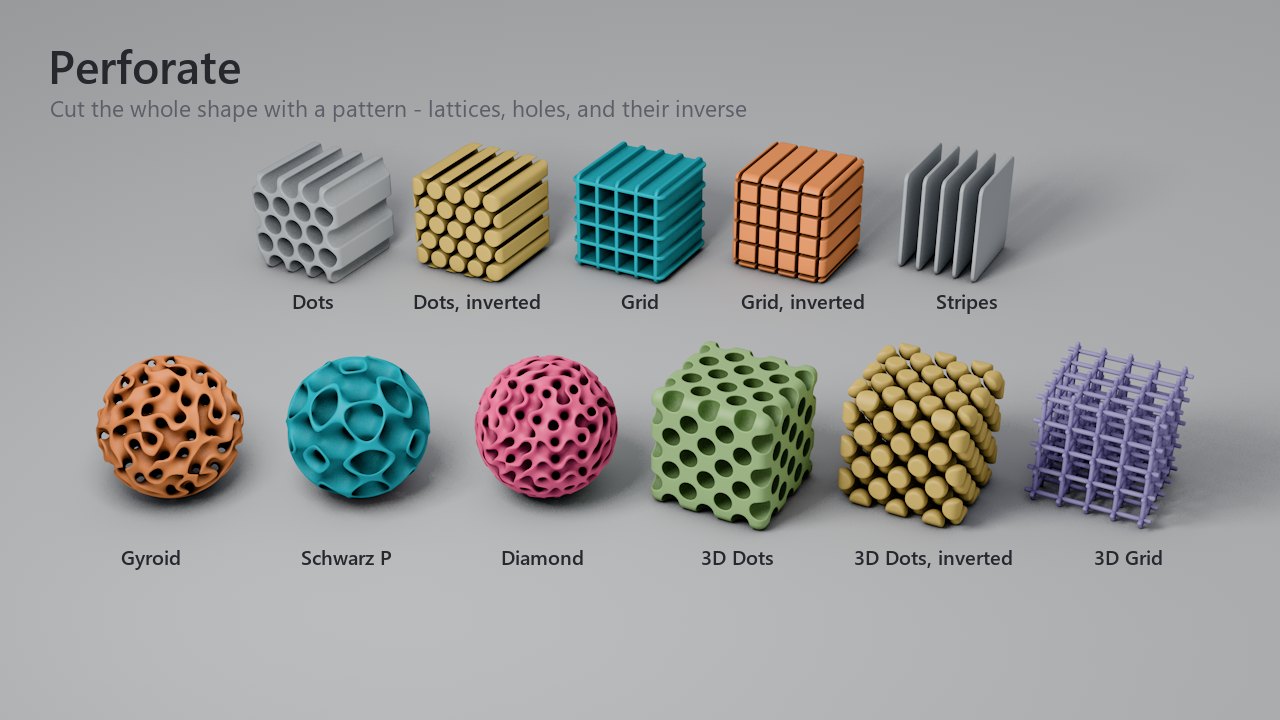
Cuts a pattern through everything below: Gyroid, Schwarz P, Diamond, Dots, Grid or Stripes, with an optional outer skin.
下の形全体を模様でくり抜きます。ジャイロイド、シュワルツ P、ダイヤモンド、ドット、グリッド、ストライプ。外側の殻も残せます。
Transform
トランスフォーム
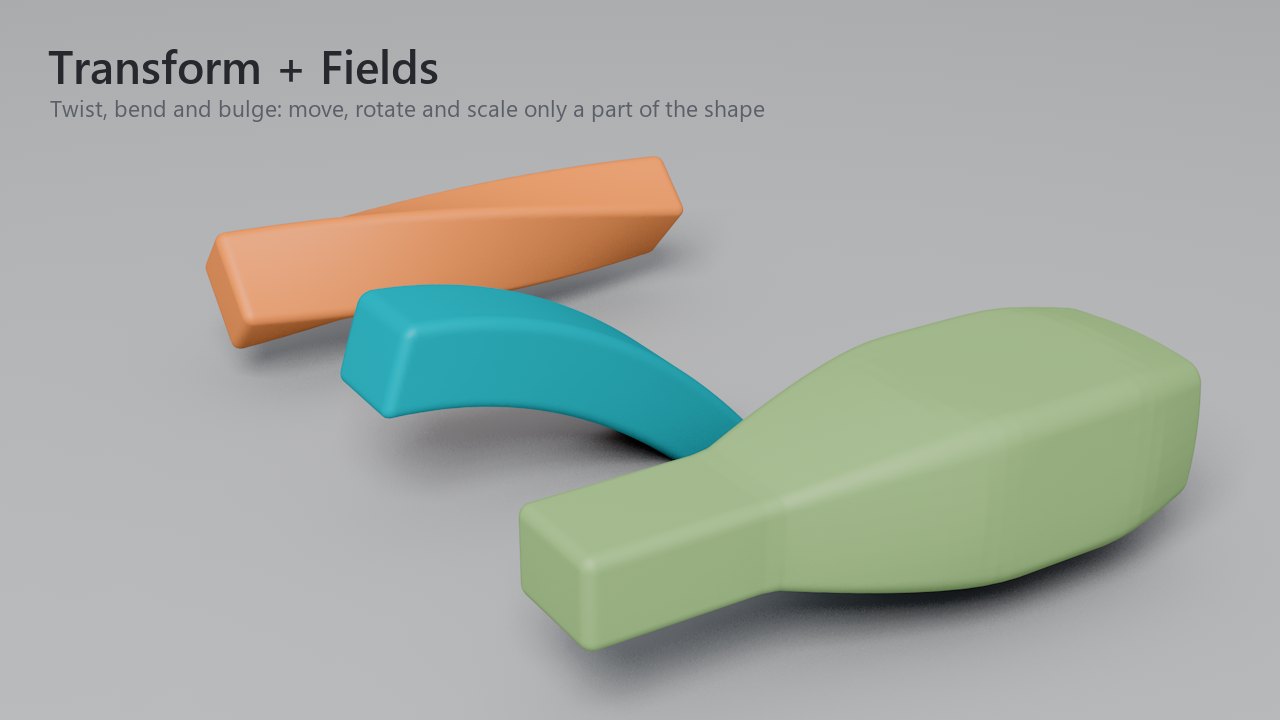
Moves, rotates and scales everything below round a pivot, by the amount (strength %).
下の形全体を、中心のまわりに移動・回転・拡縮します。量は強さ(%)です。
Color
カラー
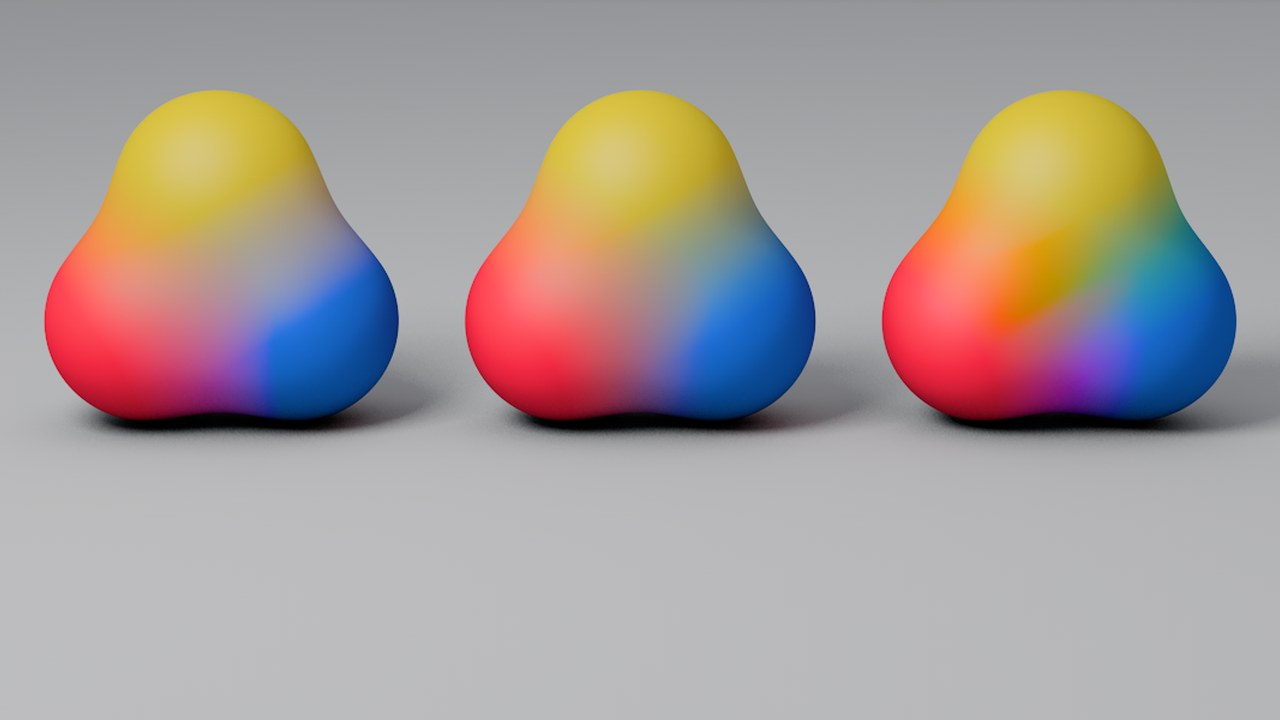
Gives everything below a color, mixed by the amount, with nine blend modes (Multiply, Screen, Overlay and more). The shape stays as it is.
下の形全体に色を付けます。量で混ぜる割合を決め、乗算・スクリーン・オーバーレイなど 9 種類の合成モードから選べます。形は変わりません。
Blend Adjust
ブレンド調整
Replaces, raises or lowers the blend widths of the items below - the items keep their own values.
下のアイテムのブレンドの幅を、上書き・加算・減算でまとめて調整します。アイテムそれぞれの値はそのままです。
Fields
フィールド対応
Effects where you want them
効果を好きな場所だけに
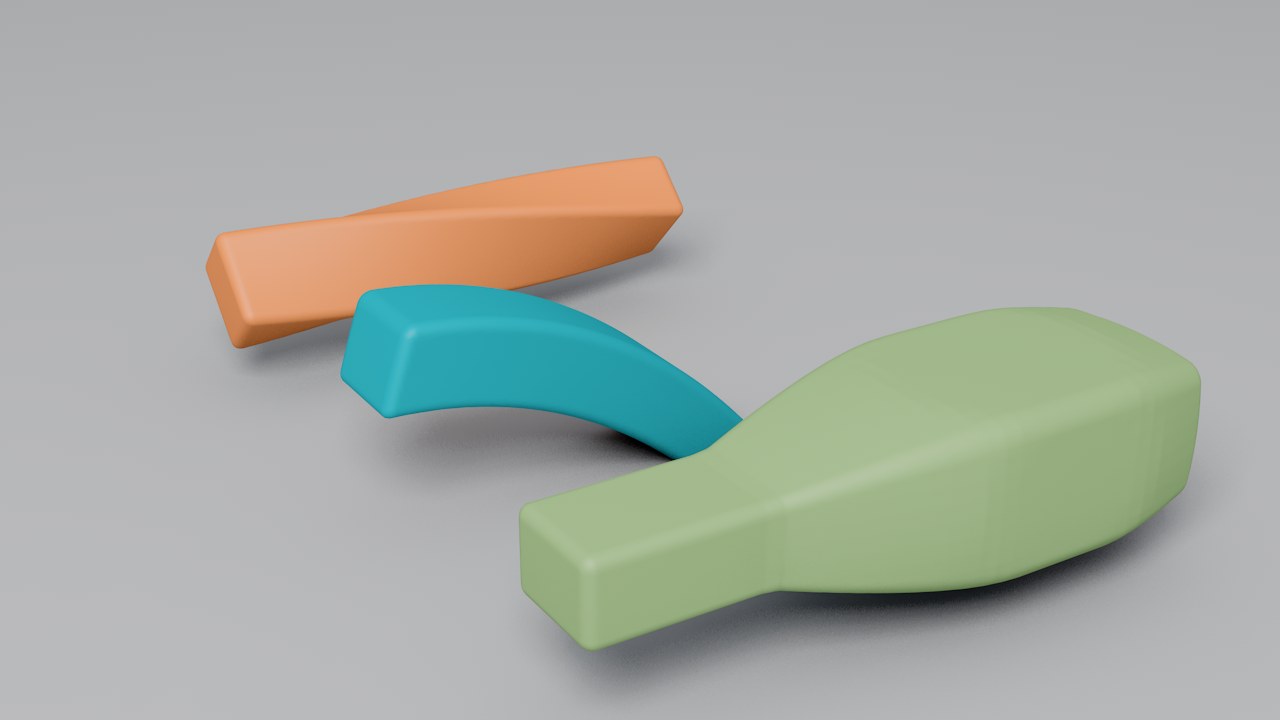
Every effect takes Cinema 4D's Field List - layers, blend modes and masks. With the Transform effect, only a part of the shape is moved, rotated or scaled - for twists, bends and bulges.
すべてのエフェクトに C4D のフィールドリスト(レイヤー・合成モード・マスク)を使えます。トランスフォームと組み合わせると、形の一部だけを移動・回転・拡縮して、ねじりや曲げ、膨らみを作れます。
More
その他の特徴
Polygons, splines and Cloners as sources
ポリゴンやクローナーもソースに
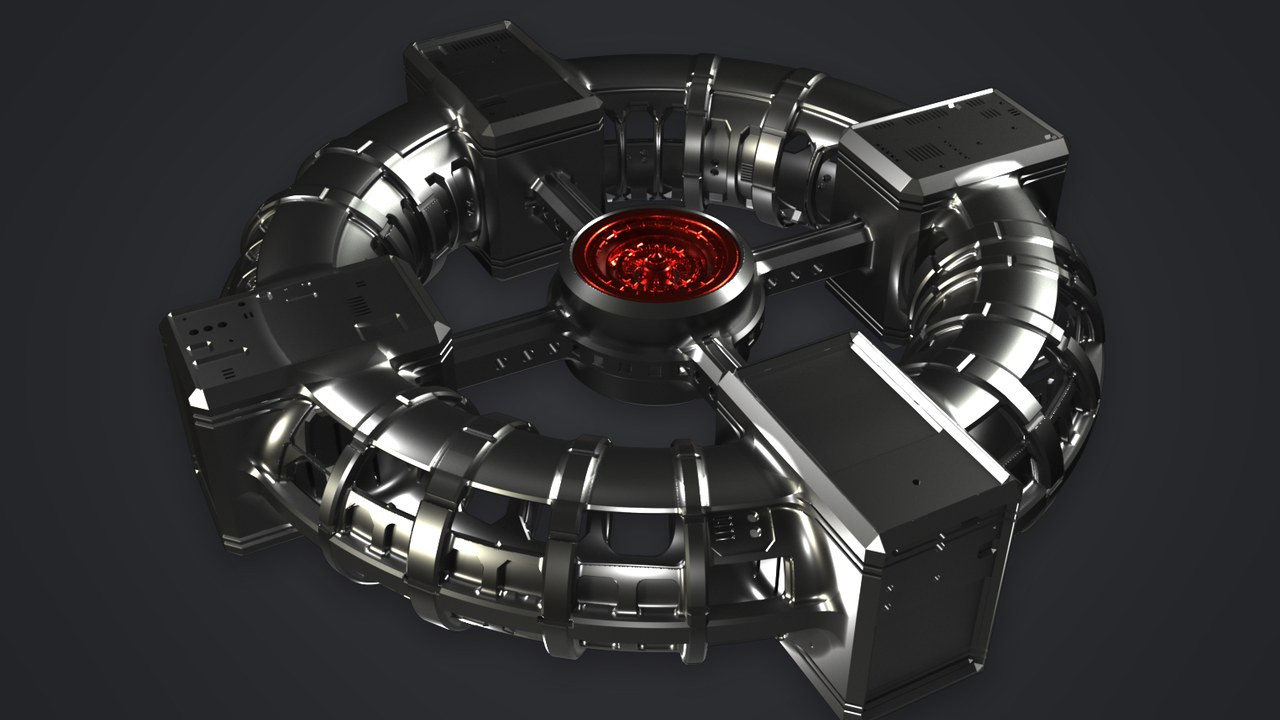
Primitives, splines, Extrudes, Lathes, Cloners, Instances and Symmetry are read as formulas - fast and exact. Polygon objects and other generators work as sources too.
プリミティブ、スプライン、押し出し、回転、クローナー、インスタンス、対称は数式として読むので速く正確。ポリゴンのオブジェクトやほかのジェネレータもソースに使えます。
Subdivision levels
細分化レベル
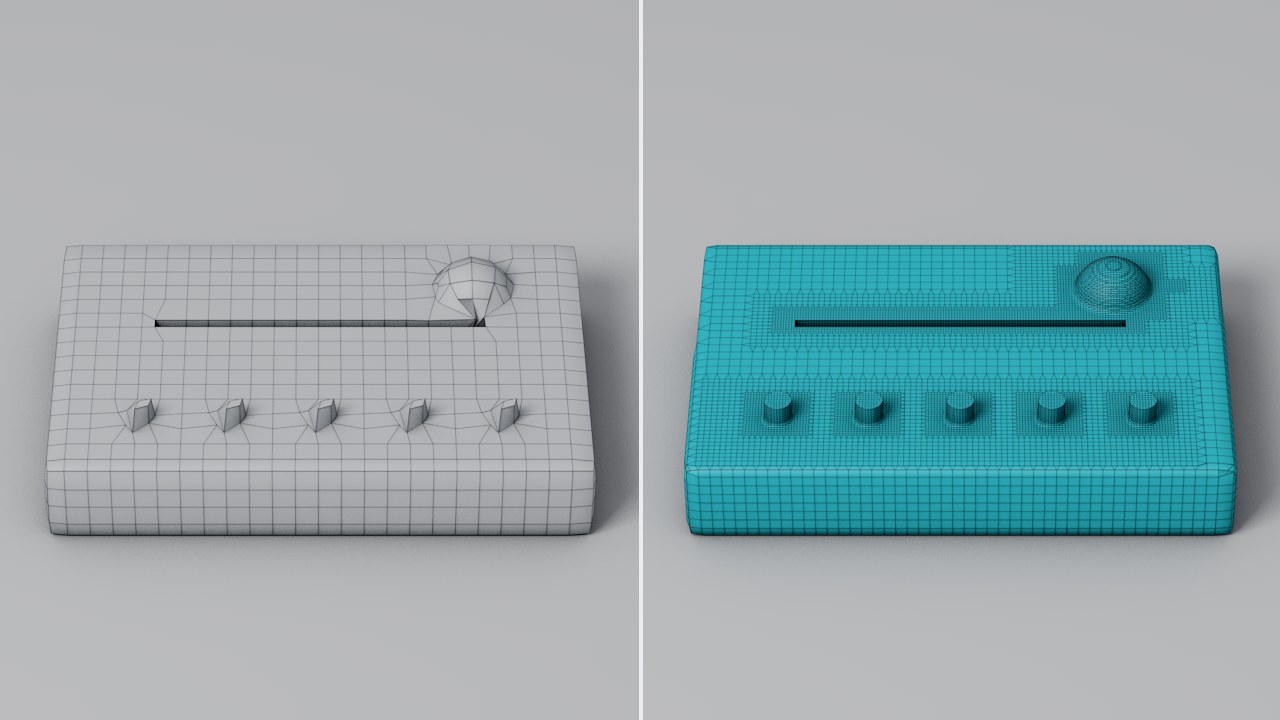
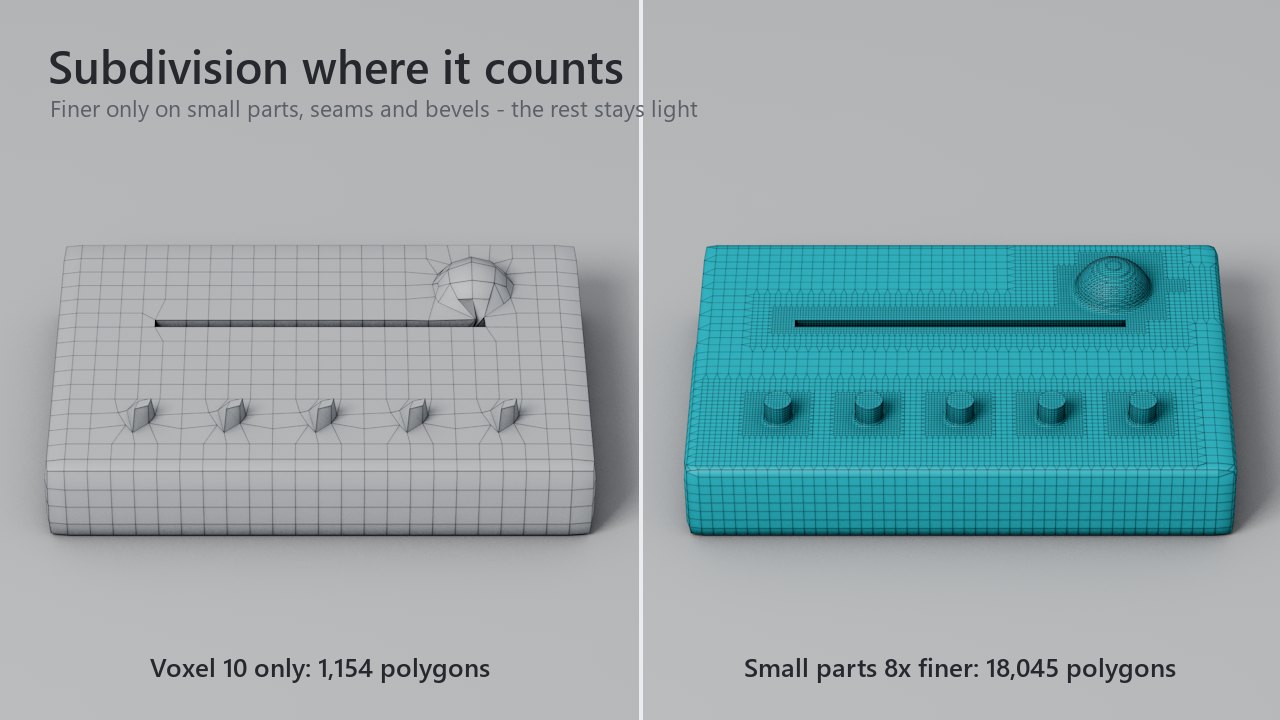
Make the mesh up to 32 times finer per item or per bevel - only where detail is needed, so the rest stays light. Left: no subdivision; right: the small parts 8 times finer.
アイテムごと・ベベルごとに、メッシュを最大 32 倍まで細かくできます。細かさが要る所だけなので、全体は軽いまま。左は細分化なし、右は小さな部品だけ 8 倍。
Octane Vectron (test feature)
Octane の Vectron に対応(テスト機能)
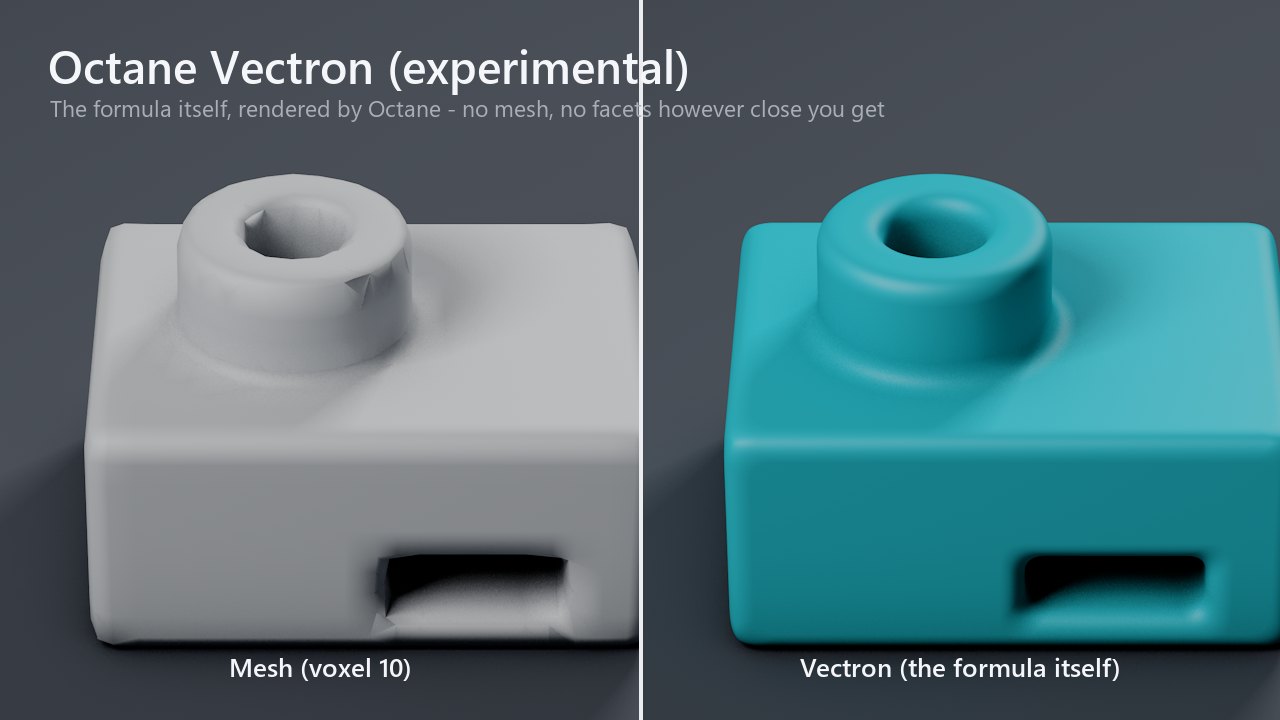
Hands the builder's shape and colors to Octane's Vectron as formulas - rendered without a mesh, so edges stay sharp however close you get.
ビルダーの形と色を、数式のまま Octane の Vectron に渡します。メッシュを使わずにレンダリングするので、どれだけ近づいてもエッジが荒れません。
Details
詳細
Requires対応Cinema 4D 2027
PlatformOSWindows 64-bit, macOS 15.5 or later (Apple Silicon and Intel)Windows 64 ビット、macOS 15.5 以降(Apple シリコン・Intel)
Price価格Free. If you enjoy it, a donation to support the development would be very welcome.無料。気に入っていただけたら、寄付で応援してもらえるとうれしいです。
Included内容The plugin, sample scenes, a short guide in English and Japaneseプラグイン本体、サンプルシーン、使い方(英語・日本語)
Version history
バージョン履歴
What each beta brought - pictures of the main features, and the full list of improvements below each.
ベータごとの進化。主な機能の画像と、その下に改善点の一覧があります。
New in Beta 3
ベータ 3 の新機能
A new Bevel effect, two new item modes, finer detail exactly where it counts - and two experimental bridges.
新しいエフェクト「ベベル」、新しいアイテムのモード 2 つ、必要な所だけの細分化、そして実験的な 2 つの連携。
NEW EFFECT新しいエフェクト
Bevel
ベベル
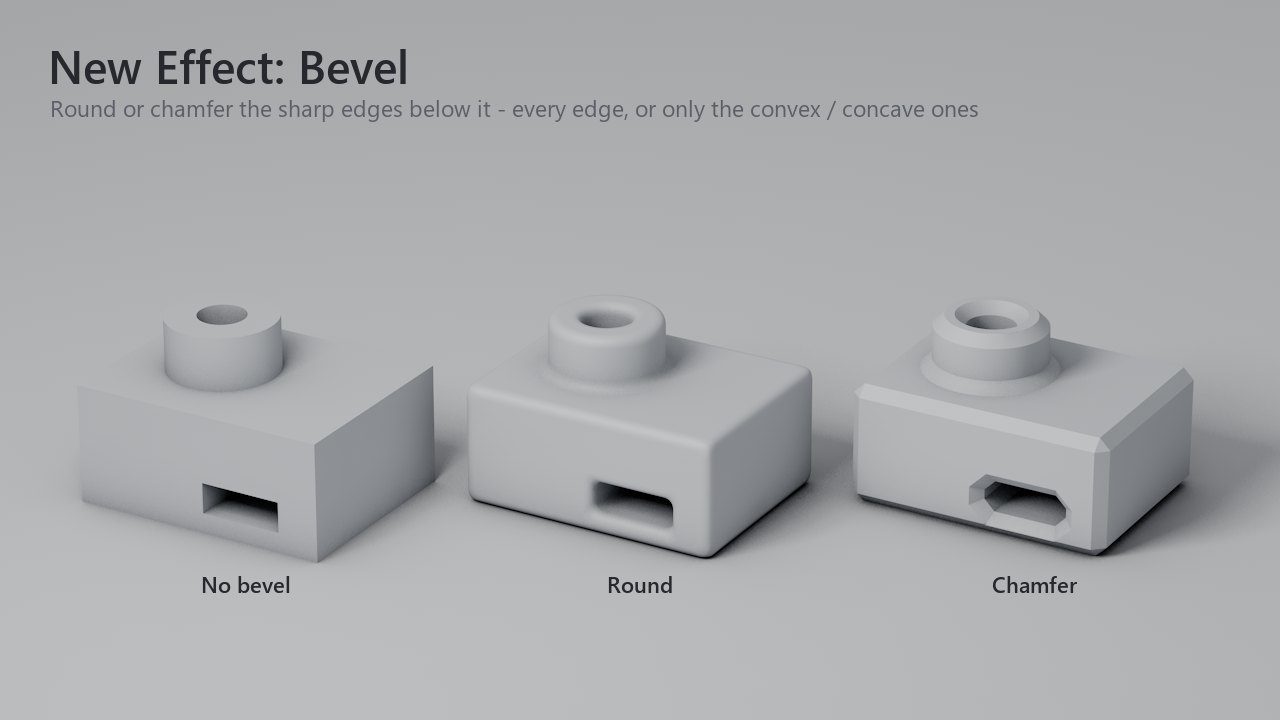
Round or chamfer the sharp edges below it - every edge, or only the convex or concave ones. Works on the seams between items and on the shapes' own edges, and can be limited by a Field.
下の形の鋭いエッジをラウンド/面取りに。すべて、凸だけ、凹だけを選べます。アイテムどうしの境目にも、形の自分の辺にも効き、フィールドで範囲を限れます。
NEW EFFECT新しいエフェクト
Bevel - pick the edges
ベベル:エッジを選んで掛ける
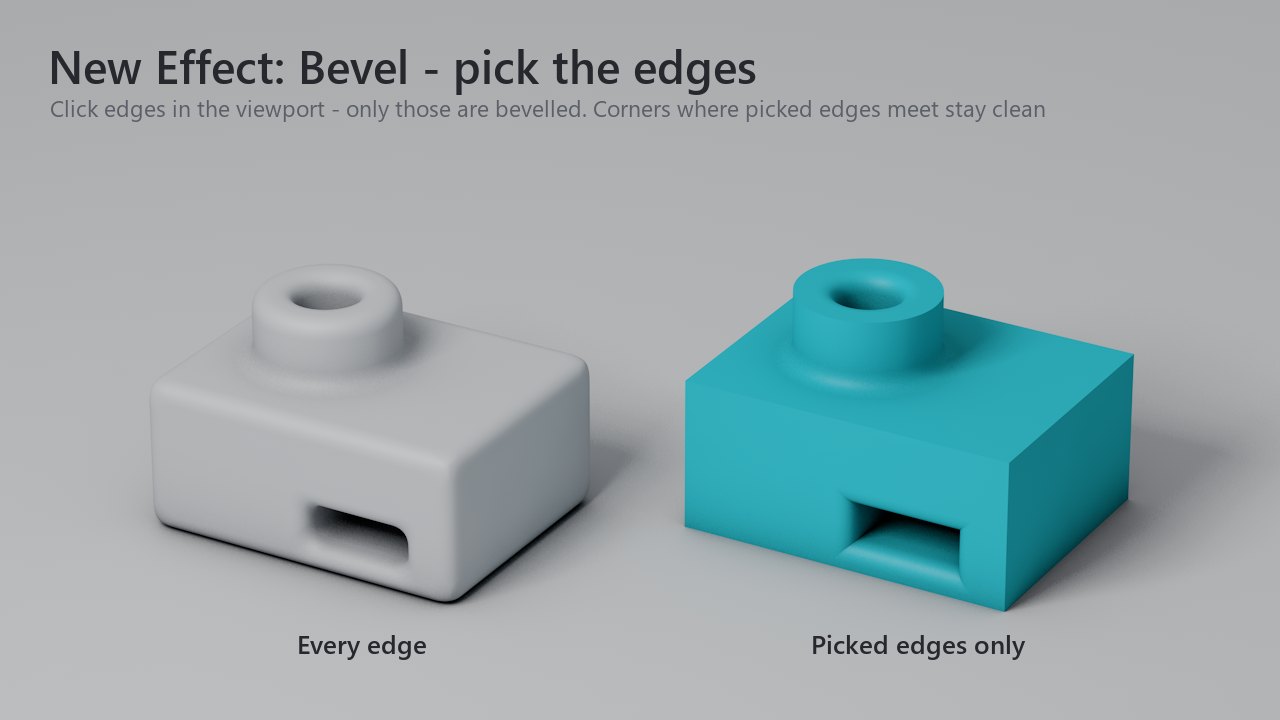
Click edges in the viewport (Shift adds, Ctrl removes) and only those are bevelled. Where picked edges meet, the corners stay clean; stack several bevels with their own widths.
ビューポートでエッジをクリック(Shift で追加、Ctrl で外す)すると、そのエッジだけに掛かります。選んだエッジが出会う角もきれいにつながり、幅の違うベベルを重ねて使えます。
NEW ITEM MODE新しいアイテムのモード
Stencil
ステンシル
Panel lines grown up: a line where the item meets the surface, or the whole area inside it. V, square or rounded sections, cut or raised, with rounded rims.
スジボリが進化。アイテムが表面と交わる所のライン、またはその内側の面全体を。断面は V 字・角・丸み、切る/盛り上げる、縁の丸めも。
NEW ITEM MODE新しいアイテムのモード
Color
カラー
An item that only paints the surface below it - no shape added. Soft or crisp edges, nine blend modes, limited by a Field if you like.
形は足さず、下の形の表面に色だけを塗るアイテム。境目のぼかし、9 種の合成モード、フィールドでの範囲指定も。
Subdivision where it counts
必要な所だけ細かく(細分化)
Keep the builder's voxel coarse and make only small parts, seams or bevels up to 32 times finer - far fewer polygons and much less time than refining everything.
ビルダーのボクセルは粗いまま、小さな部品・接合部・ベベルだけを最大 32 倍まで細かく。全体を細かくするよりポリゴンも時間も大幅に少なくて済みます。
EXPERIMENTAL実験的機能
Retopology guides
リトポ用のガイド
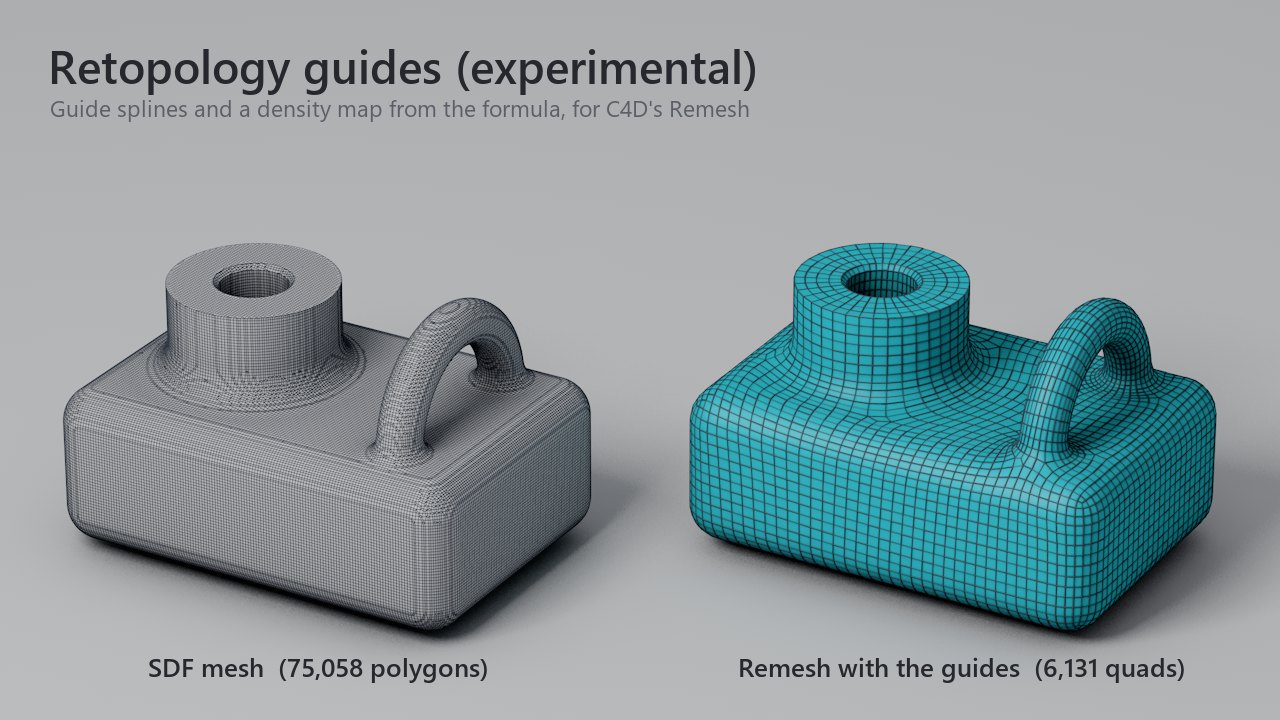
One click makes guide splines along the blends and edges and a density map, straight from the formula - hand them to Cinema 4D's Remesh for loops that follow the fillets.
ボタン 1 つで、ブレンドやエッジに沿ったガイドのスプラインと密度マップを数式から作成。C4D のリメッシュに渡せば、フィレットに沿ってループが回り込みます。
EXPERIMENTAL実験的機能
Octane Vectron
Octane Vectron
Hand the formula itself to Octane's Vectron: no mesh, so edges and bevels stay perfect however close the camera gets. The Vectron follows every change to the builder.
数式そのものを Octane の Vectron に渡します。メッシュがないので、どこまで寄ってもエッジやベベルが荒れません。ビルダーを直すと Vectron も追従します。
All improvements in Beta 3ベータ 3 の改善点の一覧
- Bevel effect - round or chamfer, on every edge or only convex / concave ones; on the seams between items and on the own edges of cubes, cylinders, tubes, cones, pyramids, extrusions (cap rims and upright corners) and lathes; limited by Fields.
- Bevel: pick the edges - click / Shift / Ctrl in the viewport, a separate selection per bevel, the number of picked edges, one click to clear; a picked bevel and an automatic bevel can be stacked.
- Bevel on more shapes - sliced shapes, rims of half spheres and open shapes, and shapes folded by Symmetry (pick one side, both sides follow).
- Cleaner bevel corners - picked seams end neatly at unpicked neighbours and join each other cleanly at corners; three rounded edges meeting at a corner flow into one smooth round; the width stays as set on faces that meet at an angle; works for clones too.
- Crisper thin bevels - chamfers about as thin as a voxel meet cleanly at inner and outer corners, with smooth shading; rims such as a cone's base round smoothly along their length.
- Faster bevels - with many picked seams one build went from about 300 ms to about 12 ms; moving shapes under a picked bevel from 253 ms to about 17 ms; dragging the width or picking edges is lighter still.
- Stencil item mode (grown from Panel Lines) - line or whole area; V, square, rounded V (round bottom) or rounded V (flared edges); cut or raised by one check box; rounded rims. Panel lines of older scenes open as stencils automatically.
- Color item mode - an item paints the surface below without adding shape, with a soft or crisp edge and nine blend modes.
- "Keep the color below" - a color source for items that should not bring a color of their own (a cut keeps the color of what it cuts).
- Subdivision levels - per item for its whole surface and for its seams, per bevel where it acts: 1 to 6 (up to 32 times finer).
- More shapes as formulas - the Oil Tank (slices too) and the Polygon primitive.
- List - duplicate items with all their settings (right-click or Ctrl-drag); objects duplicated in the Object Manager keep their item's settings and arrive on top of the list; deleting an item deletes its object too (undoable); one "Effect" button opens all effects.
- Viewport colors always on, no check box needed; bevel edges are drawn only while the bevel's Selection tab is open.
- Finer Fields - effects read their Fields finer near the surface; "Increase field precision" per effect for even more.
- More stable when dragging a Field in the viewport.
- A "Create" tab collects the buttons that make tags, materials, guides and the Vectron.
- Experimental: Octane Vectron (the formula rendered by Octane) and retopology guides (guide splines and a density map for the Remesh).
- エフェクト「ベベル」:ラウンド/面取り。すべて・凸だけ・凹だけ。アイテムどうしの境目と、立方体・円柱・チューブ・円錐・ピラミッド・押し出し(キャップの縁と縦の角)・回転体の辺に効き、フィールドで範囲を限れます。
- ベベル:エッジを選んで掛ける:ビューポートでクリック/Shift/Ctrl。ベベルごとに別々の選択、選択中の本数の表示、選択の解除。選択つきのベベルと自動のベベルを重ねられます。
- ベベルが掛かる形が増えました:スライスした形、半球やキャップなしの形の縁、対称で折り返した形(片側を選ぶと両側が丸まる)。
- ベベルの角がきれいに:選んだ境目は選んでいない隣で自然に終わり、選んだ境目どうしは角できれいにつながります。丸めた辺が 3 本集まる角もひとつながりの丸みに。斜めに出会う面でも幅は指定どおり。クローンにも同じ仕上がり。
- 細いベベルがくっきり:ボクセルと同じくらいの細い面取りも、内側・外側の角ですっきりつながり陰影もなめらか。円錐の底のような鋭い縁も、縁に沿ってなめらかに丸まります。
- ベベルが速く:境目をたくさん選んだ形で、1 回の組み立てが約 300 ms → 約 12 ms。選択つきベベルの下で形を動かすと 253 ms → 約 17 ms。幅のドラッグやエッジの選択中はさらに軽快。
- アイテムのモード「ステンシル」(スジボリが進化):ライン/エリア、断面は V 字・角・丸みのある V 字(底が丸い)・丸みのある V 字(縁がなだらか)。チェック 1 つで切る/盛り上げるを反転。縁の丸めも。前のシーンのスジボリは自動でステンシルになります。
- アイテムのモード「カラー」:形を足さずに下の表面へ色を塗ります。境目のぼかし、9 種の合成モード。
- 色の元「下層の色を保つ」:自分の色を持ち込まないアイテムに(減算で削った面が削られる前の色のまま)。
- 細分化レベル:アイテムごとの「全体」「接合部」、ベベルの「細分化レベル」。1〜6(最大 32 倍の細かさ)。
- 数式で読む形が増えました:オイルタンク(スライスも)とポリゴンのプリミティブ。
- リスト:アイテムを設定ごと複製(右クリック・Ctrl+ドラッグ)。オブジェクトマネージャで複製しても設定を引き継ぎ、リストの一番上に入ります。アイテムを削除するとオブジェクトも削除(Undo 可)。「エフェクト」ボタン 1 つで全エフェクトの一覧。
- ビューポートの色表示はいつもオン(チェック不要)。ベベルのエッジの線は「セレクション」タブを開いている間だけ表示。
- フィールドがより細かく:表面の近くで細かく読みます。エフェクトごとの「フィールドの精度を上げる」でさらに細かく。
- 安定性の向上:ビューポートでフィールドをドラッグしている間の組み立て。
- 「作成」タブ:タグ・マテリアル・ガイド・Vectron を作るボタンをまとめました。
- 実験的機能:Octane Vectron(数式のまま Octane で描画)、リトポ用のガイド(リメッシュ用のガイドのスプラインと密度マップ)。
New in Beta 2
ベータ 2 の新機能
New effects, new kinds of noise, Fields everywhere, and cleaner sharp rims.
新しいエフェクト、ノイズの種類、すべてのエフェクトでフィールド、きれいな鋭い縁。
Clean Sharp Rims
鋭い縁をなめらかに
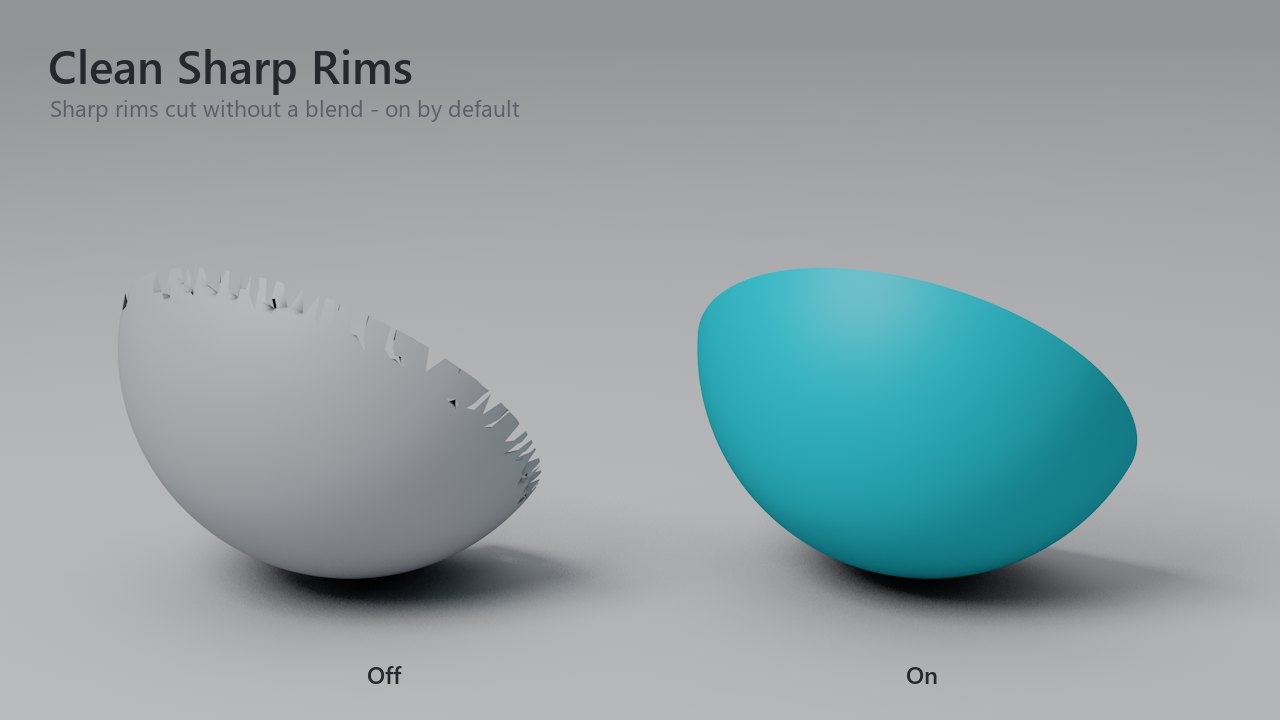
Sharp rims cut without a blend come out clean - on by default.
ブレンドなしで切った鋭い縁がきれいに。標準でオン。
NEW EFFECT新しいエフェクト
Transform + Fields
トランスフォーム+フィールド
Move, rotate and scale only a part of the shape: twists, bends and bulges.
フィールドで一部分だけを移動・回転・拡縮。ねじり・曲げ・膨らみ。
NEW EFFECT新しいエフェクト
Perforate
パーフォレート
Cut the whole shape with a pattern - lattices, holes and their inverse.
形全体を模様でくり抜きます。網目、穴、その反転。
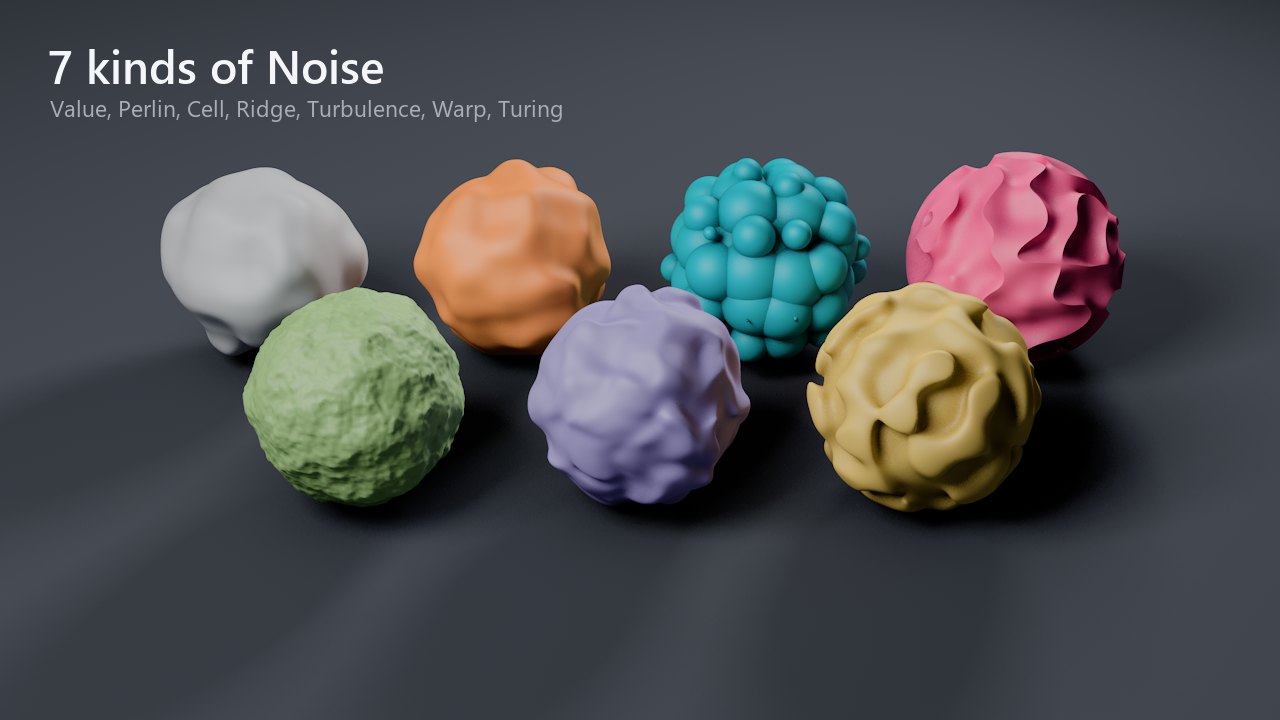
7 kinds of Noise
7 種類のノイズ
Value, Perlin, Cell, Ridge, Turbulence, Warp and Stripes & Spots.
値・パーリン・セル・リッジ・乱流・ゆがみ・しまと斑点。
NEW ITEM MODE新しいアイテムのモード
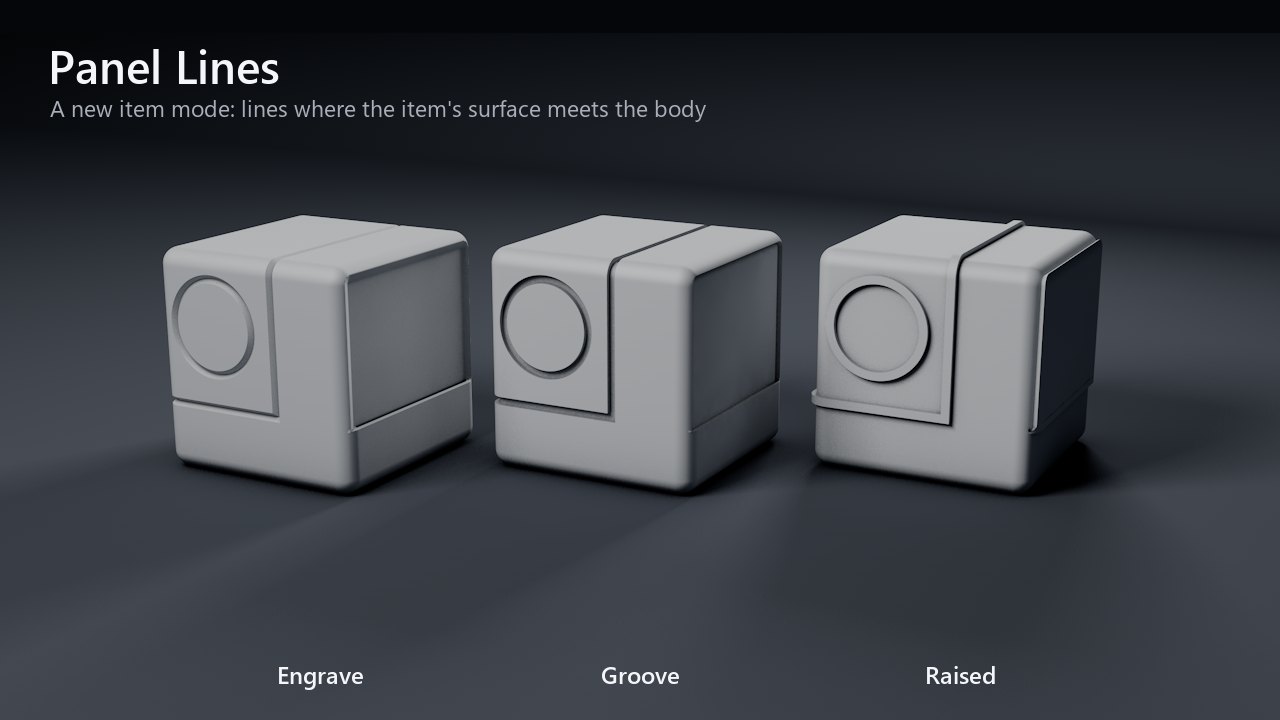
Panel Lines
スジボリ
Lines where the item's surface meets the body - engraved, groove or raised (grown into the Stencil in Beta 3).
アイテムの表面が本体と交わる所にスジ(彫り込み・溝・盛り上げ)。ベータ 3 でステンシルに進化。
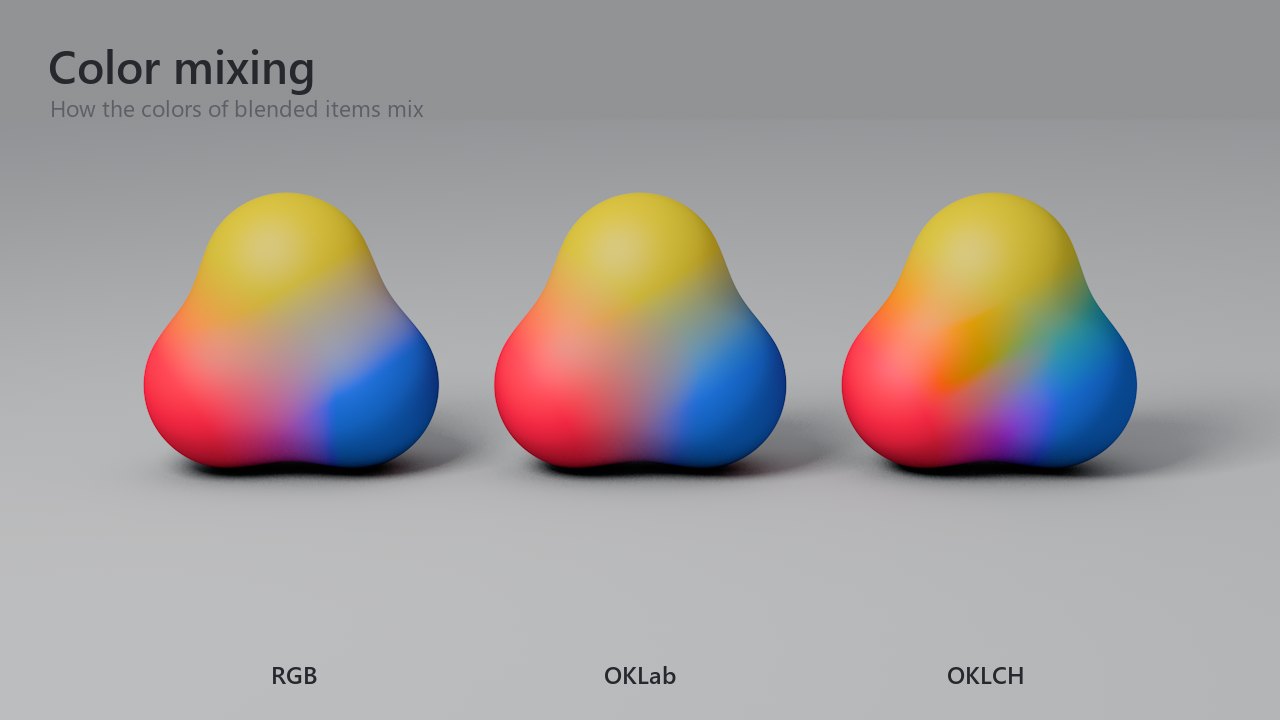
Color mixing
色の混ぜ方
Colors of blended items mix in RGB, OKLab or OKLCH.
ブレンドした色を RGB・OKLab・OKLCH で混ぜられます。
All improvements in Beta 2ベータ 2 の改善点の一覧
- Panel Lines: a new item mode that draws a line where the item's surface meets the body - engraved (V), groove or raised.
- Perforate: cut the whole shape with a pattern - gyroid, Schwarz P and diamond lattices, dots, grids and stripes.
- Transform: move, rotate and scale everything below; with a Field only a part moves - twists, bends and bulges.
- Color: change only the color of what is below, with 9 blend modes.
- Blend Adjust: widen or tighten the blends of the items below, by a Field if you like.
- Noise now comes in 7 kinds (Perlin, cell, ridge, turbulence, warp, Turing patterns ...).
- Every effect takes Cinema 4D's Field List - layers, blend modes, masks.
- Colors mix in OKLab or OKLCH for smoother, more vivid blends, with a gradient width per item.
- One click makes a vertex color material for Redshift, Octane or the Standard renderer.
- Clean Sharp Rims (on by default): sharp rims cut without a blend come out clean.
- More shapes are read as formulas: spline tubes with a radius curve and flat or round ends, open-spline extrusions (bands), all cap bevel shapes of the Extrude, cone fillets.
- Morph now uses 0 - 100 like the other items, and the list shows color, type and time for every item.
- スジボリ:アイテムの新しいモード。アイテムの表面が本体と交わる所にスジを入れます(彫り込み・溝・盛り上げ)
- パーフォレート:形全体を模様でくり抜きます(ジャイロイドなどの網目、ドット、グリッド、ストライプ)
- トランスフォーム:下の形全体を移動・回転・拡縮。フィールドと組み合わせると一部分だけが動き、ねじり・曲げ・膨らみが作れます
- カラー:下の形の色だけを変えます(合成モード 9 種)
- ブレンド調整:下のアイテムのブレンドの幅を広げる/締める(フィールドで場所ごとにも)
- ノイズが 7 種類に(パーリン、セル、リッジ、乱流、ゆがみ、チューリングなど)
- すべてのエフェクトが C4D 標準のフィールドリストに対応(レイヤー、合成モード、マスク)
- 色の混ぜ方に OKLab/OKLCH を追加。なめらかで鮮やかなブレンドに。アイテムごとのグラデーション幅も
- 頂点カラーのマテリアルをボタン 1 つで作成(Redshift、Octane、標準)
- 鋭い縁をなめらかに(標準でオン):ブレンドなしで切った鋭い縁がきれいに出ます
- 数式で読める形が増えました:太さのカーブと端の形(丸/平ら)を持つスプラインの管、開いたスプラインの押し出し(帯)、押し出しのキャップのベベルの全種類、円錐のフィレット
- モーフの値がほかのアイテムと同じ 0〜100 に。リストに色・タイプ・処理時間を常に表示
Beta 1 - the first release
ベータ 1:最初の公開
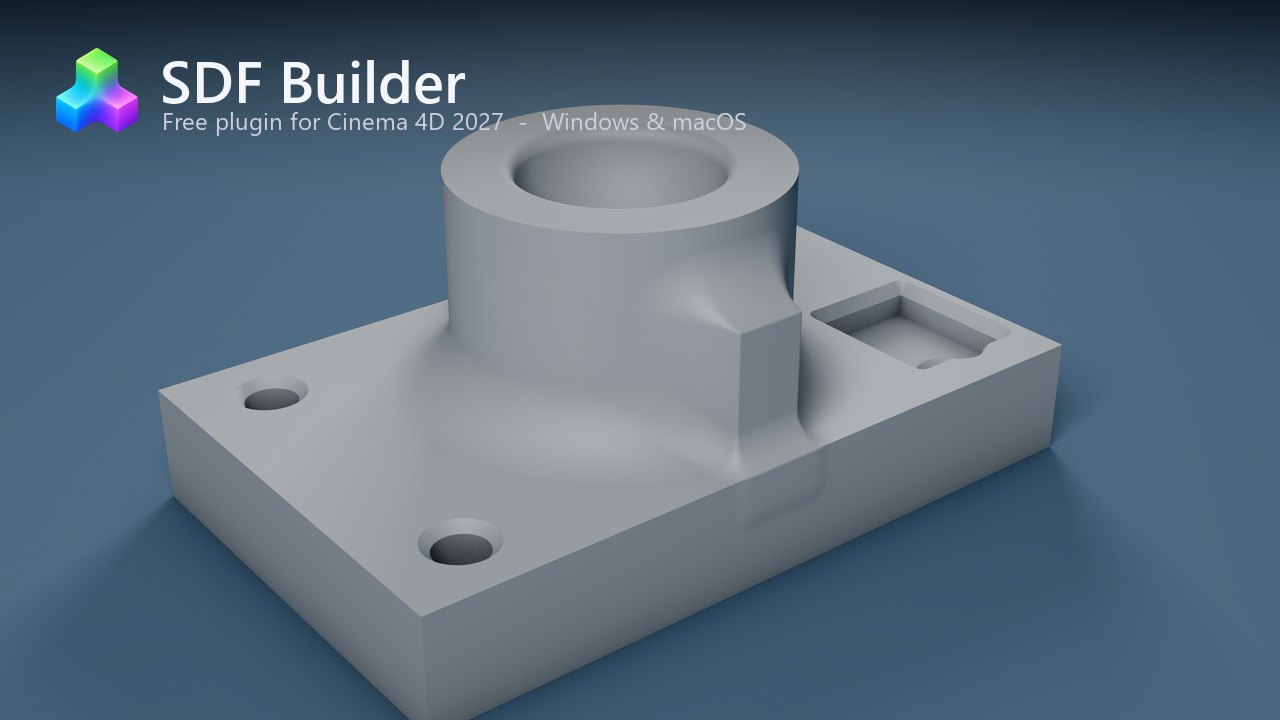
Hard surface, procedurally
ハードサーフェイスもプロシージャルに
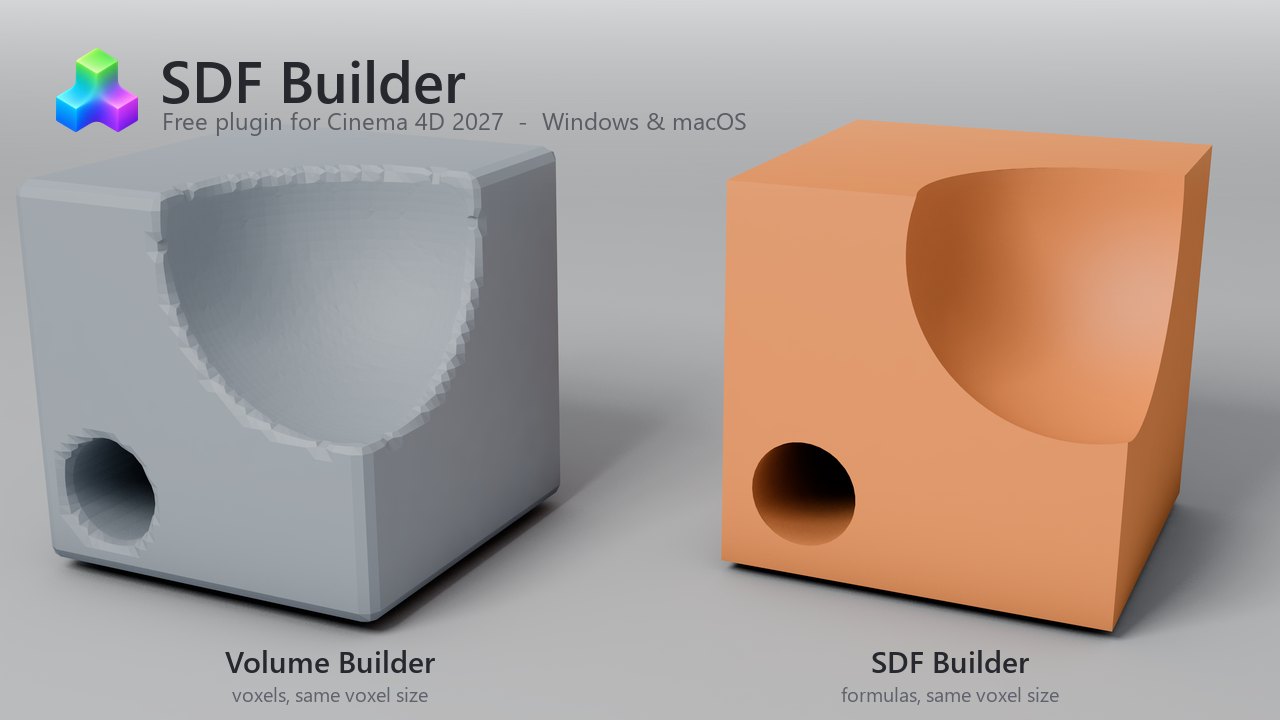
Formulas instead of voxels
ボクセルではなく数式で
What Beta 1 broughtベータ 1 の内容
- A list of items like the Volume Builder's, with on / off, modes, blends, groups and drag-and-drop of any object.
- Union, Subtract, Intersect, XOR and Morph; Soft, Smooth and Chamfer blends, per item and between clones.
- Offset, Shell and Noise effects, limited by Fields.
- Primitives, splines, Extrude, Lathe, circular Sweeps, Instances, Cloners and Symmetry read as formulas; other polygon objects too.
- Normals from the formulas, vertex colors that blend with the shapes, a weight map per item, keyframes on every setting, SDF Builders as parts.
- ボリュームビルダーのようなリスト(ON/OFF、モード、ブレンド、グループ、どのオブジェクトもドラッグで追加)。
- 合成・減算・交差・排他・モーフ。ブレンドはソフト・スムーズ・面取り(アイテムごと、クローン同士)。
- オフセット・シェル・ノイズのエフェクト(フィールドで範囲指定)。
- プリミティブ、スプライン、押し出し、回転、円断面のスイープ、インスタンス、クローナー、対称を数式で読み、ほかのポリゴンのオブジェクトも使えます。
- 数式から作る法線、形に合わせて混ざる頂点カラー、アイテムごとのウェイトマップ、すべての設定へのキーフレーム、SDF Builder を部品として入れ子に。